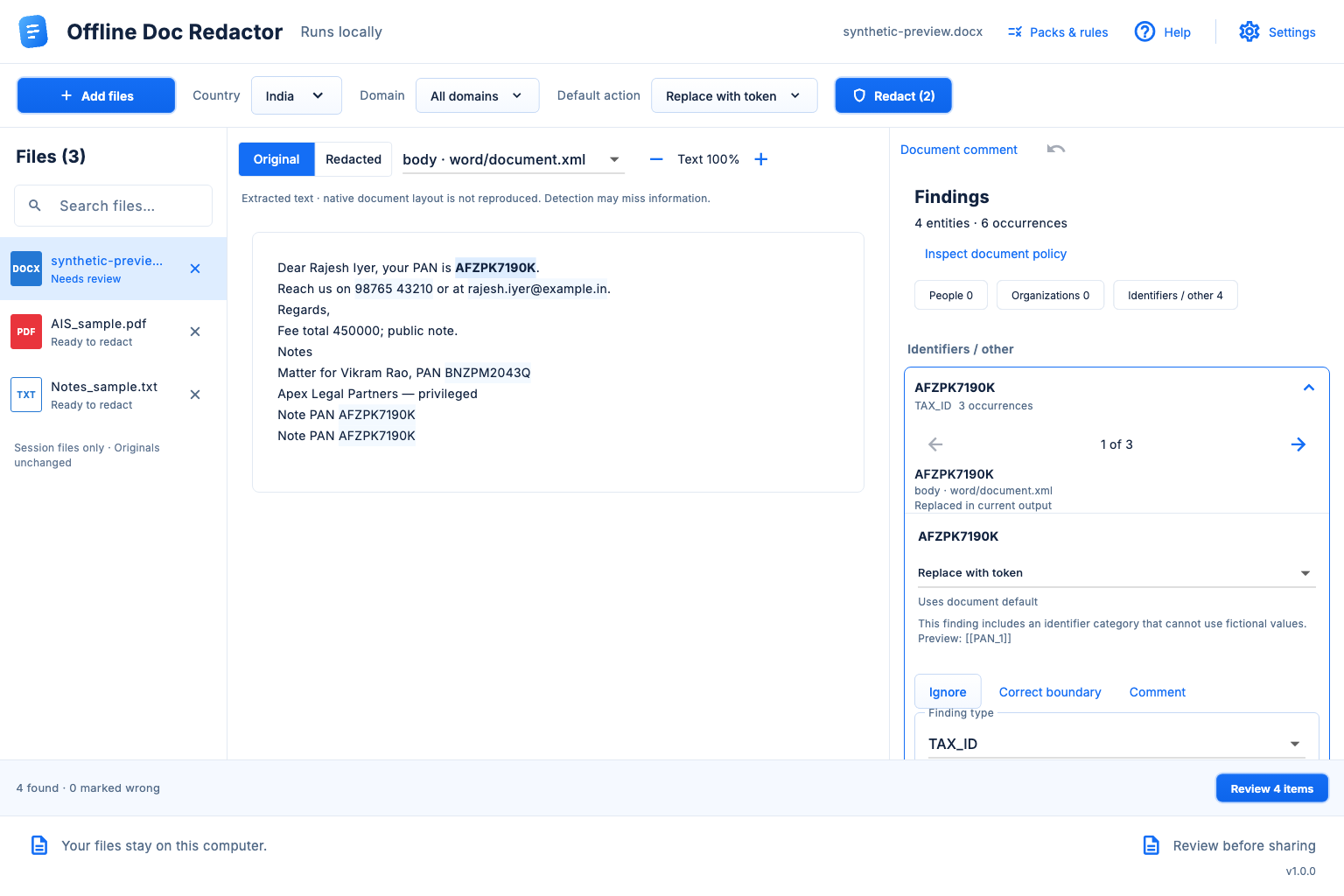
Inspect findings in context
Look at the proposed name, contact detail or structured identifier where it appears. A tax amount may be essential to an analysis; an account number may not be. The app’s review controls let you choose a default action and override individual findings rather than treating every match alike.
Correct misses and excess matches
Manually mark a missed value and choose how it should appear in the output. You can also keep a value that was incorrectly flagged. When a value repeats, check that the same decision is applied consistently where you intend it.
A clean-looking screen is not a clean-file certificate
Some content may be unreadable, hidden or outside the supported extraction path. Review unresolved content and the exported file itself. This workflow does not promise automatic completeness or anonymity.
Keep what serves the task
A number under “Project fee” can be essential to a financial analysis. A similar-looking number under “Account reference” may identify a client record. Review makes it possible to keep the first and change the second. The surrounding label, the question being asked and the intended reader all matter.
The same value may appear more than once. A person can be named in the header, body and signature line. Review repeated matches together, then inspect each occurrence in the output. If the detector missed an address or a reference, mark it in the document before saving.
The value's field and role explain why the two decisions differ.
Findings beside the document
The review screen groups repeated findings while keeping the text in view. In this fictional example, the reviewer can inspect occurrences, adjust an action and compare the redacted result.