Why redact before an AI upload?
A tax preparer may need help drafting questions about two contractor expenses, while the source workpaper also holds a client’s name, taxpayer reference, bank details and internal file code. Sending the whole document gives an AI provider information the task does not require. The IRS urges tax professionals to safeguard client data; its advice does not authorize a particular AI use.
The consequence is concrete. The NSW Reconstruction Authority reported that a former temporary employee uploaded a spreadsheet containing information about 2,031 people to an AI tool the agency had not authorized. The agency identified the tool as ChatGPT and said there was no evidence the data was publicly available. This was a housing-program spreadsheet, not tax records. The lesson for a tax practice is to check authorization and reduce the input before an upload.
Check the policy for the exact AI account
Popular services do not have one shared policy. Consumer and organizational accounts can have different model-improvement settings, retention rules and review paths. The provider summary below was checked against primary pages on 22 October 2026; recheck the linked terms before any real client use.
| Service and account | Provider’s stated data use | What to verify |
|---|---|---|
| ChatGPT personal | OpenAI says model-improvement sharing is enabled by default for Free, Plus and Pro personal workspaces, with an opt-out for new chats. | Check the signed-in workspace, data control and retention terms. |
| ChatGPT Business, Enterprise, Edu and API | OpenAI says inputs and outputs are not used to train its models by default. | Check the organization’s agreement, access, retention and approved purpose. |
| Claude consumer and commercial | For consumer plans, Anthropic lists user opt-in and safety-review cases for model improvement. For Claude for Work and API, it says inputs and outputs are not used for training by default, with feedback and opt-in exceptions. | Check the product, feedback controls and the applicable commercial terms. |
| Gemini Apps and Google Workspace | Google’s consumer privacy hub describes activity settings, possible human review and use to improve services. Its qualifying Workspace privacy hub says content is not used to train generative AI models outside the domain without permission. | Check whether the account has qualifying Workspace protections, plus activity and retention settings. |
| Microsoft Copilot for Microsoft 365 | Microsoft says organizational prompts, responses and Graph data are not used to train foundation models. It also stores interaction history under the organization’s Microsoft 365 controls. | Check the licensed product, tenant controls, access and retention policy. |
A “not used for training” statement addresses one use of data. It does not mean the provider never processes or retains an upload, and it does not give a preparer permission to share a client file. Confirm the exact destination with the firm and client obligations that apply.
Define the question and the smallest useful input
Write the task first: “Draft follow-up questions about two contractor expense entries with one missing invoice.” That needs expense type, month, amount and invoice status. It does not need a tax return, address, taxpayer number or bank reference. If a short, accurate excerpt can answer the question, use it rather than the full workpaper.
Keep the original file intact and give the working copy a neutral filename. A client name in a filename can disclose information even after the page content changes.
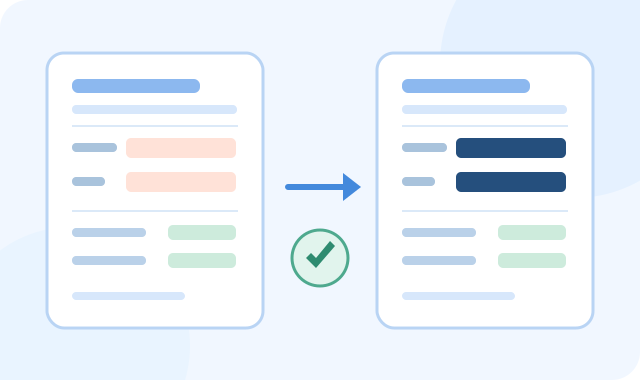
See the original and reviewed workpaper side by side
This near-real workpaper is entirely fictional. It is an illustration of an editing decision, not an official tax form or a tested product output. On a narrow screen, the original appears above the reviewed copy.
FY 2025 · Schedule C review
Contractor expenses
- Client
- Rowan Example
- Client file
- CEDAR-CASE-17
- Contact
- rowan@example.test
- Tax reference
- TEST-ID-ONLY
- Bank reference
- DEMO-ACCOUNT-0042
- Reviewer
- A. Sample
Expense entries
| Month / category | Amount / record |
|---|---|
| April · contractor | $8,400 · invoice available |
| June · contractor | $11,200 · invoice missing |
Reviewer note
Ask Rowan Example for the June invoice before finalizing the expense review.
FY 2025 · contractor expense question
Contractor expenses
- Client
- CLIENT_1
- Client file
- Omitted
- Contact
- Omitted
- Tax reference
- Omitted
- Bank reference
- Omitted
- Reviewer
- Omitted
Expense entries
| Month / category | Amount / record |
|---|---|
| April · contractor | $8,400 · invoice available |
| June · contractor | $11,200 · invoice missing |
Question
Draft follow-up questions for CLIENT_1 about the missing June invoice. Do not decide tax treatment from these entries alone.
The client label keeps repeated references connected. The contact, synthetic tax and bank references, reviewer name and internal file code add nothing to this task. Amounts and invoice status remain because they drive the follow-up question. Even this reviewed copy may still be identifiable from context.
Prepare and check the saved copy
- Choose a supported method. Work from a separate file or make a short excerpt. The supported-files guide explains the product’s scope for English text-based PDF, ordinary DOCX and UTF-8 TXT. A scan or image needs a separately verified OCR process.
- Remove, replace or retain deliberately. Replace a repeated client name with a consistent token only if the relationship matters. Remove identifiers and unrelated pages. Preserve the figures needed for the question.
- Open the saved output. Read every included page, table, header, footer and note. Search for values meant to be removed, inspect the filename and try copying text from affected areas. Check comments, tracked changes, attachments, metadata or hidden content with a method suited to the format.
- Resolve unreadable areas. Do not treat a clean-looking preview as proof. Adobe distinguishes PDF redaction from sanitization of hidden data. Leave scanned, protected or uninspectable material out of the AI input until it can be checked.
A token such as CLIENT_1 is pseudonymization, not a guarantee of anonymity. The ICO explains that other information can still make someone identifiable.
Conclusion: share only what the approved task needs
Start with the exact question, prepare the smallest useful input locally, inspect the saved result, and then decide whether the specific AI account is approved to receive what remains. If that last decision is unclear, keep the work in the existing approved process.
Offline Document Redactor is intended to help prepare and review supported copies locally. See the tax and finance workflow and the broader guide to document privacy when using AI. The current site offers a waitlist for product and access updates; it does not provide a verified installer download.