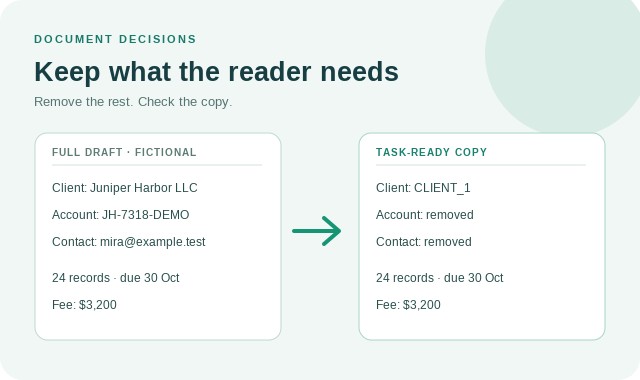
Start with the recipient's task
A client asks you to send a project summary to an outside reviewer. The reviewer needs the scope, dates and fee, but the draft also names the client, lists a private account reference and includes an internal contact. The useful question is not “Can I black out every name?” It is “What is the smallest document this reviewer can use?”
Decide the purpose and recipient first. Work on a separate copy, remove information they do not need, and inspect that exact copy before sending it. Redaction cannot itself grant permission to share the remaining content or make it anonymous.
Confirm who may receive the copy
Write down the reader's job in one sentence, then check the intended channel and any client, employer or contractual limits. A colleague who is allowed to see a project budget may not be allowed to see a customer's personal account details. If you cannot establish that the sharing is authorized, stop before making or sending a copy.
Consider other people named in the file and clues that identify someone together: an unusual role, precise location and date may undo a simple name replacement. For an AI destination, also check the specific provider and account terms; the AI privacy guide explains those separate questions.
Make a remove-or-retain decision for each field
| Information in this example | Decision | Reason for this reviewer |
|---|---|---|
| Client name and repeated mentions | Replace with one stable token, CLIENT_1 | The reviewer needs to follow one party through the summary, not know the legal name. |
| Private account reference and contact email | Remove | Neither helps assess scope or price. |
| Work period, deliverables and fee | Keep | These are the facts the reviewer was asked to check. |
| Unusual project details | Review in context | A combination of ordinary facts might still identify the client. |
The decisions will change with the task. A payment reviewer may need an account reference, while an editorial reviewer should not receive it. A token preserves relationships; it is not proof of de-identification.
Work through a fictional client summary
This entire example is fictional. An outside reviewer has been asked only to confirm the deliverables and $3,200 project fee. The source contains more information than that request requires.
14 October 2026
Quarterly records review
- Client
- Juniper Harbor LLC
- Account
- JH-7318-DEMO
- Contact
- mira@juniper.example
- Fee
- $3,200
Deliverables
Review 24 records and prepare a two-page summary by 30 October. Juniper Harbor LLC will approve the final wording.
14 October 2026
Quarterly records review
- Client
- CLIENT_1
- Account
- Removed
- Contact
- Removed
- Fee
- $3,200
Deliverables
Review 24 records and prepare a two-page summary by 30 October. CLIENT_1 will approve the final wording.
The candidate retains the requested scope, deadline and fee. It removes the account and contact, and replaces both client-name occurrences consistently. A real reviewer must also check the rest of the file and any hidden or identifying context.
Use the procedure that fits the file
For a readable PDF, follow the offline PDF redaction guide and check that text was actually removed, not just covered. For a Word file, follow the DOCX guide and inspect comments, revisions and properties separately. For plain text, make a UTF-8 working copy, replace or delete the chosen strings, and reopen it to check line context. The supported-files page explains the planned app's file boundaries.
Search for every value you intended to remove, including alternate spellings and repeated mentions. Read tables, headers, footers and filenames. A format-specific tool may have additional checks; an empty automated finding list is not a completed review.
Inspect the exact copy and destination
Open the saved file as the recipient would. If the client name still appears in a footer, correct the working copy, export again and inspect the new result. Check that the retained deadline and fee are still readable. Then confirm the actual address, account or upload destination and the permissions of the person receiving it.
If the task is specifically to prepare an approved AI request, the tax example shows how that decision changes for a workpaper. The check before upload remains separate from the redaction operation.
Conclusion: share the smallest useful copy
Start with the recipient's job, make explicit remove-or-retain choices, apply them to a separate file and inspect what you actually saved. Keep the facts that make the document useful; remove the unnecessary identifiers and reconsider combinations of clues. If you are evaluating a local workflow for this preparation, see the pre-release desktop product and join the launch waitlist.